Guest communication is a cornerstone of running a profitable vacation rental business.
Handling booking inquiries, arrival messages, and post‑checkout follow‑ups across multiple properties is time consuming and requires around the clock attention.
In this article, we explore how automated guest communication tools can help you to lighten your workload, elevate your operations, and enhance the guest experience, without losing the personal touch.

As a property manager, you know that when there’s an issue with a booking, fast and effective guest communication can often make the difference between a glowing review and a poor one.
This is most pronounced for short-term vacation rentals, where guest expectations are concentrated over a smaller time frame.
When turnover is high and you are handling a steady stream of booking inquiries, arrival instructions, Wi-Fi setups, heating adjustments, and key or code requests every week, automating guest communication becomes a must.
What are automated communication tools?
Tools like smart messaging systems and AI-driven workflows can save you valuable time, while also ensuring that your guests receive an immediate response addressed specifically to them.
Automation tools can handle key communication touchpoints and resolve minor guest issues in record time, often without you needing to engage with the matter directly. You’ll still be notified for matters that require personal attention, keeping you fully informed and ensuring guest satisfaction.
How automation improves guest communication at scale
Automation tools make it easy to maintain active listings for multiple properties, and handle increased bookings across several platforms without significant extra effort, while keeping in mind what your guests are looking for .
Key aspects of automation include:
- Standardized message templates saves you valuable time, and ensures professionalism across all interactions. It means you won’t forget to include any key details, and every guest receives the same high-quality experience.
- Pre-scheduled messages are sent at exactly the right time, and can even be triggered by live data such as guest location or weather conditions. Automated responses to guest queries arrive instantly, showing your clients that their comfort and satisfaction are a priority.
- Personalization features give automated messages a more human touch, which helps your guests feel welcomed and valued during their stay.
Let’s put these into context by looking at the booking process:
The guest experience begins with: fast and clear communication
Pre-booking communication
Automation can streamline initial inquiries and provide potential guests with the information they need to make a booking decision.
These tools can:
- Automatically respond to inquiries with property details, pricing, availability, and access to booking calendars and online booking systems.
- Detect a guest’s language from their inquiry and switch to localized messaging (including currency and measurements) without manual intervention.
- Identify gaps between existing reservations and send targeted offers (e.g. Mid-week special deal) to prospects browsing those dates.
Arrival and check-in
A smooth arrival and check-in process sets the tone for a positive guest experience. You might want to automate this, but still without losing the personal and professional touch.
You can leverage on this by automating:
- Pre-arrival messages with detailed check-in instructions, including directions, access codes, or parking information. You can use tools to automatically send a message when a guest’s phone crosses a predefined radius (e.g. 5 km from the property).
- Offering automated self-check-in options, such as smart locks and keyless entry systems.
- Providing digital welcome books with essential property details and local recommendations which can be tailored to the date and time of arrival, as well as current weather conditions.
Mid-stay support
Maintaining communication throughout the guest’s stay ensures their comfort and addresses any issues promptly. Automation can facilitate this by:
- Sending automated check-in messages to ensure guests have settled in comfortably, and giving an opportunity for early feedback.
- Providing easy access to FAQs, property manuals, and contact information for support.
- Automating reminders for scheduled services, such as cleaning or maintenance.
Post-departure
The guest journey doesn’t end at check-out. Following up with guests can lead to positive reviews and repeat bookings. Automation can assist with:
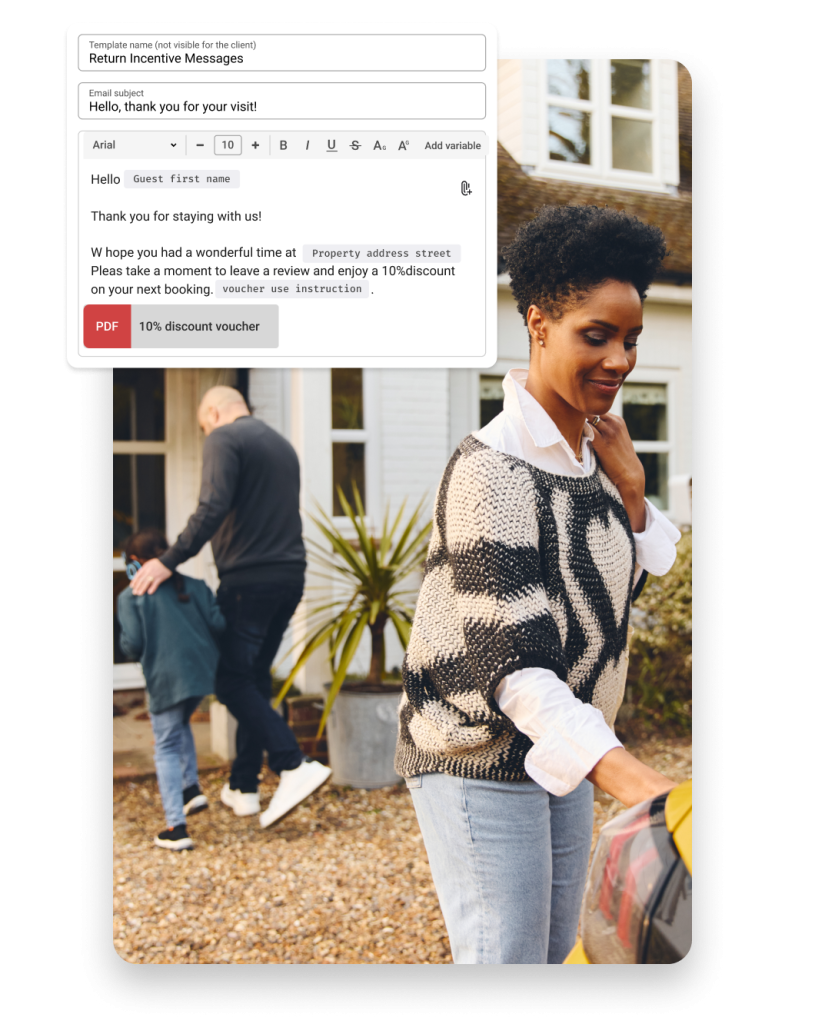
- Sending automated thank-you messages after departure.
- Requesting guest reviews, timed to when the guest engaged most, increasing the likelihood of positive, detailed feedback.
- Offering incentives for future bookings, including loyalty program invitations and referral codes for friends.
What’s the best tool for guest communication?
Automating messages for your guests hinges on having a centralized inbox, scheduling event-driven templates, leveraging AI for real-time replies, and empowering guests with self-service resources—all without constant manual oversight.
There are many tools available, but our top pick is the Unified Inbox.
A unified inbox is a centralized messaging tool that gathers communications from multiple booking platforms into one place.
Rentals United’s Unified Inbox can display 90+ booking channels, all in one dashboard. It’s included free in all Rentals United plans, and users can view reservation details alongside each conversation, filter messages for quick access, receive real-time notifications, and send or receive attachments directly.
Post-stay, users can manually reply to reviews or set up automatic Airbnb reviews, auto-sent after eight days. This helps increase review volume and improve overall ratings for your properties.
Airbnb data shows that positive reviews influence 90% of bookings, so managing review responses effectively is critical in maintaining and improving your conversion success.