

A guest messages you on Airbnb asking about early check-in. You’re mid-reply to a different guest on Booking.com. By the time you switch tabs, the Airbnb guest has already messaged two other listings in the same building. This isn’t a hypothetical, it’s just what happens when your guest messages live in four separate logins and your attention can only be in one of them.
A unified inbox fixes the mechanics of that problem: every conversation from Airbnb, Vrbo, Booking.com, email, SMS, and WhatsApp lands in one thread, with the reservation attached, and your reply goes back out through whichever platform the guest actually used. But the tool alone doesn’t fix anything if you set it up in the wrong order. Connect first, assign ownership second, automate only the safe parts third. Skip that order and you’ve just built a louder version of the same four tabs.
The real cost is the booking you never got
Every OTA’s native inbox has its own notification logic and its own idea of what’s urgent, which means properly watching four of them is a full-time job nobody actually has time for. That’s an annoyance. The more expensive part is what it does to your response time.
A traveler comparing listings rarely messages just one. They message three properties in the same area and book whichever host answers first with something useful. A slow reply doesn’t read as “busy,” it reads as unavailable, and the booking goes to whoever answered in the meantime. Every message sitting unread in a tab you haven’t checked yet is a live shot at a reservation, not just an inbox backlog.
Connect every channel, then prove the connection actually works
Start with the channels carrying your volume, typically Airbnb, Vrbo, and Booking.com, before adding email, SMS, or WhatsApp on top. Doing it one platform at a time is slower up front, but it means if something breaks, you’re debugging one connection instead of untangling four at once.
Before you trust a newly connected channel with real guest conversations, test it properly: send a real reply and confirm it actually lands on the guest’s side of the original platform, confirm the thread is attached to the correct reservation, and confirm the timestamp matches what the platform itself recorded. Then send a test message the other direction. Attachments and images tend to break before plain text does, so test one before calling a channel done. A guest communication setup that pulls in 90-plus channels with reservation details already attached to each thread is what makes this step fast instead of a week of manual checking.
Somebody has to own every thread, or you’ve just built a louder inbox
Four separate inboxes, each watched by one person, had accidental ownership built into the structure. One combined inbox watched by four people has none, and two people giving a guest two different answers to the same question does more damage than a slow reply ever would.
Assign every thread to a specific person. Keep notes directly on the thread rather than in a side chat, so whoever picks it up next reads the history instead of asking around for context. At shift change, hand off explicitly and name who owns whatever’s still open, don’t assume the next person will scroll back and figure it out. Then filter what’s left: by check-in date to catch arrivals first, by channel when one platform is misbehaving, and by how long a message has sat unanswered. Filters are what keep a combined inbox from turning into one undifferentiated wall of text.
Automate what’s repeatable, keep judgment calls off autopilot
Sort by consequence, not by how much effort a message takes to answer. Check-in instructions, directions, mid-stay check-ins, and post-stay review requests are repeatable and low-risk, automate those. Complaints, refund requests, damage disputes, and anything touching money carry real downside if the automated answer is even slightly wrong. Keep those on a person.
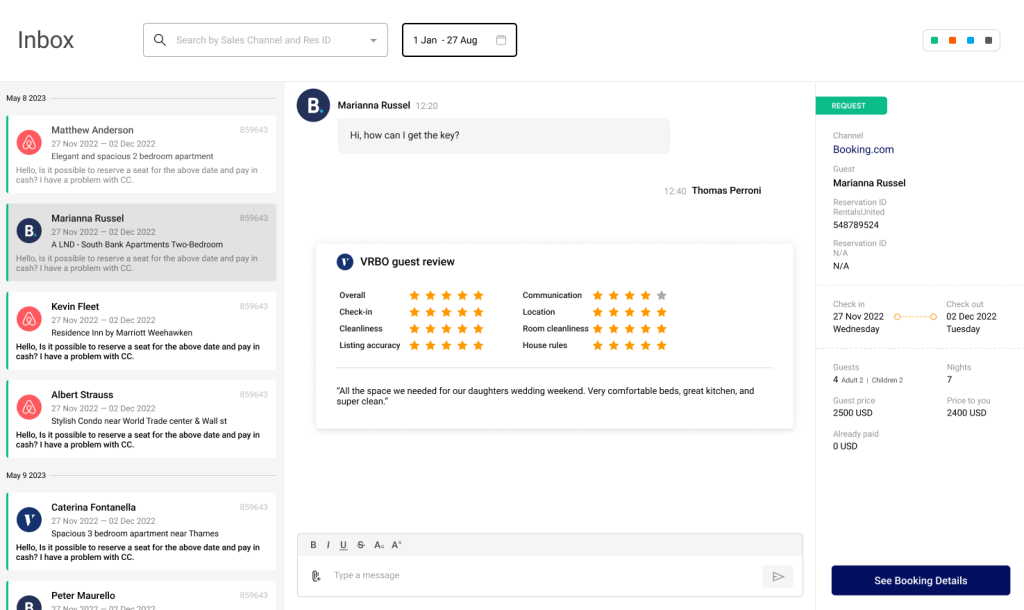
Worth being direct about here: a channel manager like Rentals United handles the guest communication with personalized, triggered messages with variables like guest name and arrival details, plus automated or one-click Airbnb review responses. It does not bundle an AI that reads a guest’s tone and drafts a judgment call on its own, and that’s a deliberate distribution-layer approach rather than a gap: it means you can pair your channel connections with whichever AI communication tool actually fits how your team works, rather than being stuck with whatever ships built in. Either way, automation still needs a human checking the outgoing queue occasionally. Templates go stale, a parking policy changes, and an automated message will keep repeating the old answer until someone actually reads it.
Is this worth building if you only manage two channels?
If you’re on two channels and you’re the only one answering messages, honestly, the payoff is modest. You’ll save some tab-switching. Your day won’t feel meaningfully different.
The moment it starts paying for itself is the second person on your team, or the third channel, whichever comes first. Portfolio size barely matters here. Once either threshold hits, the cost of not having a clear ownership trail starts outweighing the cost of setting the system up properly. One thing worth flagging before you assume you’re covered either way: consolidating your messages doesn’t consolidate your performance metrics. Airbnb still scores your response rate on its own clock, independent of every other channel, so a fast blended average can quietly hide one platform where you’re actually falling behind.
Frequently asked questions
What does a unified inbox for vacation rentals actually do? It pulls guest messages from every channel you list on, Airbnb, Vrbo, Booking.com, email, SMS, and WhatsApp, into a single thread view with the reservation details attached, so you’re not manually cross-referencing a calendar to answer a simple question.
Do replies still go out through the platform the guest actually used? Yes, on a properly connected channel. The guest never sees a difference between messaging you directly and messaging you through a unified inbox, your reply lands back on the same platform they messaged you from, with the same account they booked through.
Can more than one team member work the same inbox without stepping on each other? Only if you assign ownership deliberately. Consolidating messages without assigning threads to specific people just replaces four inboxes that had accidental ownership with one that has none, which is how two people end up giving a guest two different answers to the same question.
Does a unified inbox replace checking each OTA’s own performance dashboard? No. Each platform still measures your response rate and response time independently. Combining your messages into one view doesn’t combine your scorecards, so it’s worth checking per-channel metrics separately, not just your blended average.It’s the peak of the summer season, and your vacation rental properties are booked up. Your team’s working hard at answering the influx of messages about check-in procedures or the best places to eat in town. Meanwhile, other guests are complaining that the AC isn’t working or that they need a late check-out.
How to use the Rentals United Unified Inbox?
- Receive notifications of your newest conversations with your guests and respond to them in a timely manner to show your guests that you value them and build trust.
- Decrease your response time to improve guest satisfaction and ensure repeat bookings.
- Keep all chats in one place, saving money, time, and effort spent by your team in managing multiple channels and guest communications at once.
- Earn more reviews and improve your review score. After your guest’s stay, you can write or reply to a review directly via the Unified Inbox; you can even set up automatic reviews for Airbnb, which which are shared automatically eight days after the guests departure, or sent to you to approve and share in just one-click. Check out how it works.