With summer already in full swing, many property managers are experiencing high demand for their vacation rentals.
But, even in the middle of summer, it can be hard to fill those awkward, 2-3-day gaps in your calendar. For that, you need a smart pricing and revenue management strategy. It’s all about setting the optimal rates and choosing the right minimum stay restrictions to maximise revenue.
In this article, we go through 3 strategies that will help fill gaps between your bookings to make sure you get the most out of this summer revival.
Why adjusting your minimum stay is key to filling gaps in your calendar
Before we get into the three strategies to help you fill gaps between bookings, let’s talk about minimum stays.
Typically, properties that operate in seasonal areas have minimum stay restrictions. For example:
- 5 to 7 nights is the typical mandatory stay during the high season.
- 3 or 4 nights is the standard minimum stay during the low/middle season.
Prior to COVID-19, guests who planned their trips well in advance typically booked stays from Saturday to Saturday during the high season (according to Rentals United internal data).
However, this has changed since COVID-19. Guests are no longer booking the typical Saturday to Saturday: they want more flexibility.
For example, guests may choose to travel on a Monday rather than a Saturday to avoid traffic and crowds. Or, they may need to change their flights at the last minute and end up flying on a Wednesday.
ollow best practices for Preparation Time Before Arrival.
This shift in traveller behaviour may also be due to the “working while travelling” trend. The work-from-home guest is not bound by having to take holidays from work, so they can check in and check out any day of the week.
As a result, property managers may end up with awkward gaps in their calendars. And these gaps can be virtually impossible to fill if you have strict minimum stay restrictions in place.

Let’s take an example. Property manager Matilda has a 7-day minimum restriction during the peak season for all her properties. She received a booking for the 7th to the 14th August, a typical Saturday to Saturday booking.
Her next booking is from the 18th to the 25th. While both of these bookings are great for revenue, Matilda is now left with 3 unbooked days between the two bookings.
She can still potentially get a booking for those 3 days but it all depends on whether she updates her minimum stay settings to accommodate a 3-day booking.
In times of high demand, it’s crucial to make sure that your properties are optimised for the best occupancy and profitability. And that doesn’t just mean adjusting your pricing: it also means adjusting your minimum stays.
3 ways to fill gaps between bookings and maximise occupancy
1. Adjust your minimum length of of stay settings based on booking window
Instead of decreasing your minimum length of stay for all your properties at all times, we recommend trying a more nuanced strategy.
The most effective way is to set up different length of stay restrictions for different bookings windows. For example:
- Last-minute bookings: 2-night minimum stay
- Bookings under 30 days out: 3-night minimum stay
- Bookings over 30 days out: 4-day minimum stay
At the same time, you should keep an eye on your calendar to identify gap days as soon as possible.
For example, when you see a 3-day gap between bookings that are more than 30 days out, you may want to consider revoking the 4-day minimum stay rule you have in place to fill that 3-day gap.
This will help you maximise your occupancy and make sure that your rental doesn’t stay empty on days where you could be making money.
Related: PTBA: Control Last-Minute Bookings & Eliminate Time Zone Headaches
2. Apply a premium or a discounted rate to your gap days
Strategically adjusting your minimum stay restrictions is one thing. To fill your gap days, you should also consider adjusting your rates.
You can choose from one of two strategies: apply a premium rate or offer a discount. Which one you choose will depend on factors like your guest demographic.
For example, if you manage a villa with a pool and you have a 3-day gap in the middle of the summer high season, you should apply a premium rate. In this case, your rental is still likely to get booked because there probably aren’t many other options available.
Plus, this type of accommodation has a higher turnaround cost and takes longer to prepare for the next guest. To make sure you’re still making a profit on a 2-night stay, you should try selling your gap days at a premium price point.
On the other hand, if your property is in an urban area with a lot of unbooked rentals for your dates, offering a discount on your gap days may be the way to go.
It’s also a good idea to offer a promotion when you decide to reduce your minimum stay at the last minute. Adjusting your pricing can help make your rental more attractive to guests and ensure that your gap days sell out.
Related: Booking.com Opportunities and Promotions: Everything You Need to Know
3. Stay on top of your cancellations
During COVID-19 times, last-minute cancellations are a big concern for property managers. If a guest cancels their booking, you may end up with a gap in your calendar that you need to fill quickly.
If you don’t have a lot of time left until the date of the cancelled booking, consider lowering your prices for those dates. You may already have received some money from the cancellation fee. Consider subtracting the cancellation fee from the price of your property rather than trying to sell it at the same price.
Guests who are looking to book less than 30 days in advance are probably looking for a good deal. By reducing your price, you are incentivising people to book. And you’re making the same amount of money that you would have if the booking hadn’t been cancelled last minute. It is a win-win for you and the guest.
It’s also important to know which sales channels your cancellations are coming from, and put effort into getting those dates rebooked. Typically, this can be hard to figure out. But the Rentals United Data Studio gives you the insight you need.
In Data Studio, you can see the cancellation details of all your properties connected to Rentals United over that last two weeks and which channels they are coming from.
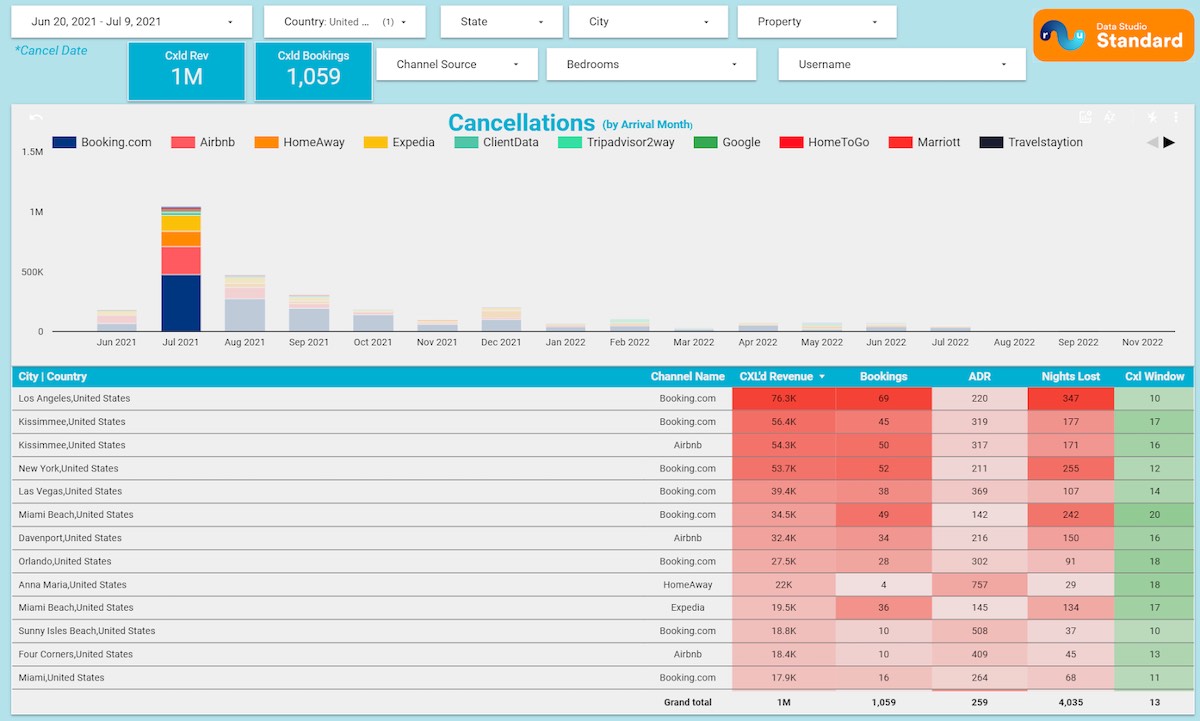
Once you’ve identified the channel the cancellation came from, you can put your effort into remarketing your property and getting it rebooked.
Related: The Case for Dynamic Pricing: Experts Share Recovery Strategies
Start filling those gaps days in your calendar
We hope this article has helped you understand how lowering your minimum stays and adjusting your pricing can help you boost your occupancy.
To sum up, we recommend:
- Setting up a minimum stay based on how much time is left until the booking.
- Increasing or decreasing your prices depending on factors like your guest demographic.
- Keeping an eye on your cancellations and identifying which channels they’re coming from so you can remarket your properties.
If you follow these strategies, you’ll be able to increase your occupancy rates and avoid empty rentals in the high season.
Are you ready to build a tech-based distribution strategy? Discover how our enterprise-level Channel Manager can get you more bookings.