At Rentals United, our goal is to provide vacation rental property managers with all the tools to drive bookings and manage their businesses efficiently. We listen to our customers and adapt our channel management platform to their needs.
That’s why we’ve improved our Charge Profile functionality, so you can effectively distribute your additional taxes and fees more precisely across sales channels.
Not only will this speed up the process of going live on new channels, but it will also help you make sure you’ve got a detailed price breakdown in your PMS, or accounting platform. No more accounting headaches!
And now, let’s see how Charge Profile works and why it’s so important.

Why is it crucial to set up all your extra charges (taxes and fees) in detail?
It’s simple: the more detailed your Charge Profile is, the faster you can go live on a new channel.
Some OTAs, like Airbnb and Vrbo, show travellers a detailed price breakdown. This includes the nightly rate plus all the fees and taxes that make up the total amount they need to pay.
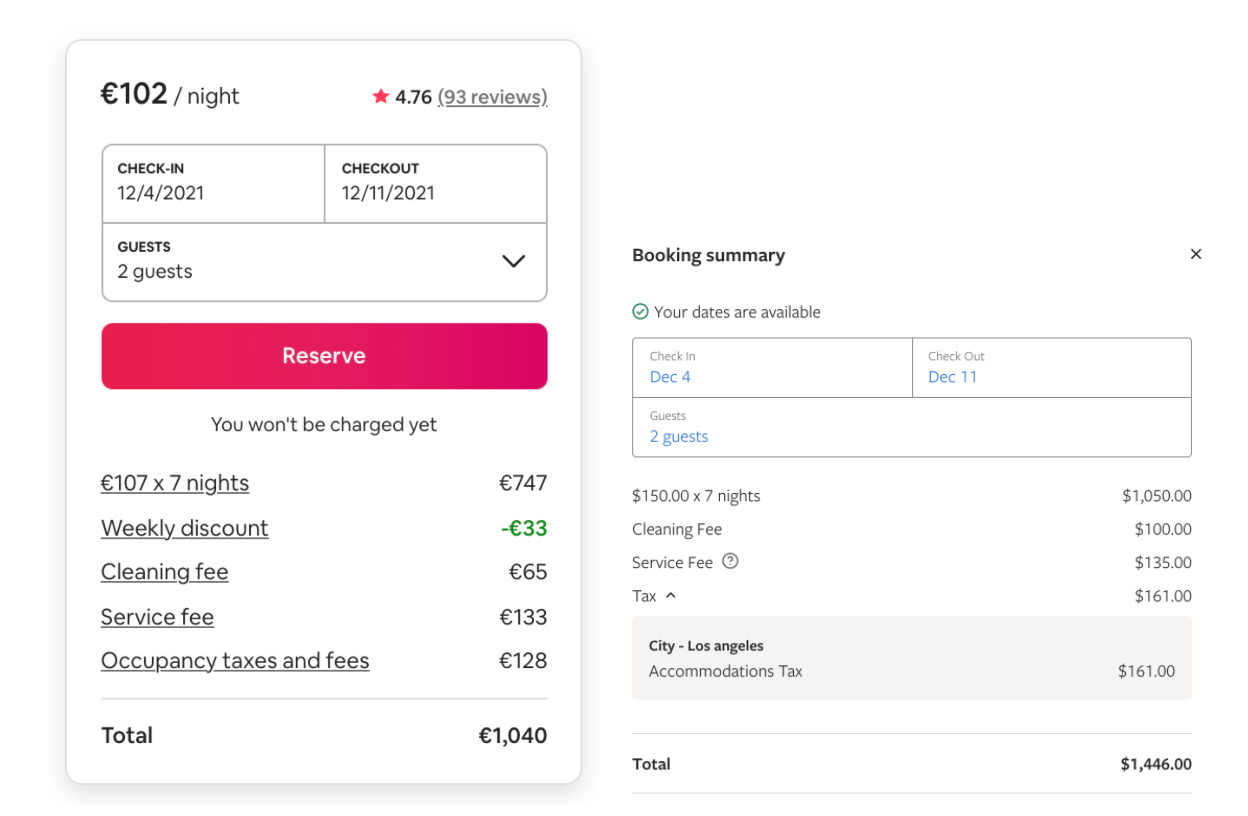
If you don’t have each of these charges specified in your channel manager, you will have trouble publishing your listings on new channels.
And once you’ve decided to expand your distribution and your listing content is ready to go, there’s nothing worse than getting delayed because your pricing structure is all wrong. You could be missing out on valuable bookings with each passing day!
That’s why, at Rentals United, we’ve created a simple but sophisticated tool that allows you to set up each extra charge separately and sync them to all your connected channels.

How can the new Charge Profile tab in Rentals United help you?
Charge Profile is a new tab in Rentals United Pricing & Availability settings that allows you to specify all additional charges in great detail.
Not only does it help you correctly set up all your extra charges and send them to your connected channel, but it also guarantees that you’ll have the correct reservation details in your PMS.
Furthermore, you can set up your taxes and fees in batches. This is super helpful if you have a large inventory. No need to update each property separately – you can create a common pricing plan for as many as you like. Note: this option is only available if you’re not a PMS user.
Using Charge Profile, you can set up additional charges in a variety of ways, which makes it possible to create advanced, multi-layered business scenarios. Then, our software automatically reorders the charges that you have set up so that they fit the linear scheme that sales channels use.
What extra charges should you set up?
There are two types of extra charges that you may need to apply to your listings: taxes and fees.
Taxes are mandatory charges that you are legally required to pay as a contribution to your country’s or city’s revenue, for example VAT or city tax.
Fees can be mandatory or optional: they cover the cost of services that are not included in the nightly rate, for example, cleaning fees, booking fees or insurance fees. You may even want to charge an extra fee for bed linens, towels, parking, Internet access or shuttle services.
In addition to extra charges, you can also use the Charge Profile tab in Rentals United to set up a down payment or security deposit for your listing.
How to set up your Charge Profile in Rentals United
Log into Rentals United and select the All properties option from the Properties tab. Select a property you want to update and click the Edit / Improve button. Then go to Step 5: Price and availability and select the Charge Profile tab.
Setting taxes and fees
- Click the green Add line item button.
- The Add a line item window opens.
- From the dropdown list, specify the charge Kind (Tax or Fee). Two additional fields appear.
- Select the Extra charge type from the dropdown list.
As the charge type is selected, the Name field automatically inherits the charge name. Note, however, that Name can be edited and filled with the custom name.
Set the Value and select the calculation logic from the Calculation type dropdown list. If you select the charge to be calculated as a percentage of the total price, then it is possible to select which line items this charge should be applied to.
Are you ready to build a tech-based distribution strategy? Discover how our enterprise-level Channel Manager can get you more bookings.