If you want to be successful at marketing your short-term rentals, you need to focus on improving your Airbnb pricing strategy.
Revenue management and distribution go hand-in-hand: you need to be able to target the right guests, on the right channels, at the right price, at the right time.
Getting your pricing right is crucial for getting bookings and increasing your conversions. And you can only do it with the help of a well-designed revenue optimisation strategy.
In this blog post, we’ll look at 3 advanced techniques you can use to improve your Airbnb pricing strategy and boost your revenue.
These tips will work whether you’re setting rates in Airbnb or using an Airbnb channel manager like Rentals United to push your prices.
Understanding how your pricing is displayed to guests on different channels can help you make the best pricing decisions. To learn more, watch our OTA Revenue Success webinar!
1. Push prices from a dynamic pricing tool
The single biggest thing you can do to improve your Airbnb pricing strategy is to start using dynamic pricing.
Dynamic pricing tools like Beyond Pricing, PriceLabs and Wheelhouse can help you find the best nightly rate for your vacation rentals at any given time.
Demand is constantly changing. If you’re adjusting your prices manually, you may be able to account for factors like seasonality, special events and the day of the week. Going beyond that would take an infinite amount of time.
That’s where smart pricing tools can help you. Their algorithms generate pricing recommendations based on a myriad of factors, from real-time market demand to your competition’s performance.
Improve Accuracy and Completeness of listings.
Frequently adjusting your rates in response to the fluctuations in demand can drastically boost your revenue. Leading dynamic pricing providers say that their clients have been able to increase their revenue by up to 40%.
Use advanced Dynamic Pricing Tools.
You can connect your dynamic pricing tools with Airbnb, or, if you want to apply your dynamic rates to all your listings across multiple channels, you can use a channel manager.
Rentals United integrates with Beyond Pricing, PriceLabs and Wheelhouse, and allows you to push your dynamic rates to all the channels you advertise on.
The pricing synchronisation is instant, so your updated nightly prices appear on the channel within a matter of seconds. Check out our list of connected vacation rental services to find out more!
2. Make discounts a part of your Airbnb pricing strategy
Apply Short Term Rental Pricing Hacks.
Airbnb knows its own customers. The OTA does constant A/B testing to figure out what its customers respond to. That’s how different types of discounts and promotions are born.
When used strategically, discounts can help property managers make their prices look more attractive to travellers. By integrating discounts into your revenue management strategy, you can rank higher in search results, get more bookings, and increase your occupancy rate.
You can set up your promotions in the Airbnb extranet or in an Airbnb channel manager like Rentals United that connects to Airbnb via API.
The best thing about promotions is that most of them (except for the last-minute promotion) make you eligible for Airbnb’s merchandising options. Merchandising means that when you apply a certain promotion, Airbnb will style your listing in a special way to make it stand out.
Depending on the size of your discount, you’ll get a tag saying “new lower price” or strikethrough pricing in search results, a new line in your price breakdown, or a “good price” sticker below the price total.
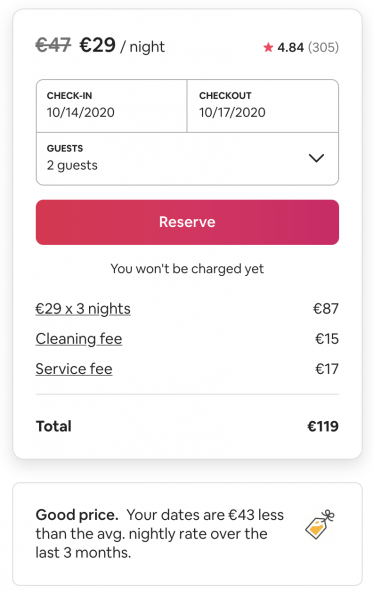
For merchandising to be triggered, you need to offer at least 10% discount on the last 30 days’ median rate.
Let’s take a look at the main types of promotions currently available on Airbnb:
1. Custom promotion
Airbnb’s custom promotion allows you to fill the gaps in your calendar and get a high occupancy rate.
You can set it up in each individual Airbnb listing’s calendar in batches of 14 days.
2. New hosting promotion
The new hosting promotion is a 20% discount for new Airbnb listings or listings that are unbooked on Airbnb. It highlights new listings and allows them to rank higher in search results until they get their first 3 bookings.
According to Airbnb, applying this promotion leads to a 30% decrease in the time to get the first booking.
It also helps inspire trust in Airbnb guests when the listing has no reviews.
If you have a lot of listings and you’re not sure which ones are unbooked on Airbnb, reach out to your account manager – they’ll be able to provide you with that data.
3. Last-minute promotion
Allow instant booking with Airbnb Request to Book.
The last-minute promotion allows you to monetise expiring inventory and fill gaps in your calendar.
You can set it up for bookings made between zero to 29 days before check-in. Keep in mind that this is the only type of discount that doesn’t enable merchandising.
4. Early-bird discount
Early-bird discounts are great for attracting travellers who like to plan ahead and incentivises guests to book further in advance.
You can choose when you want the discount to end (for example, 3 months before arrival) and set a discount (percentage or fixed amount). You can also set different levels of discounts for different booking windows.
5. Length-of-stay (LOS) discount
LOS discounts allow you to set weekly or monthly discounts. You can also set discounts for custom lengths of stay, for example, 2 weeks or 3 months.
This is a great tool because it helps you attract mid-term guests and encourage travellers to book extended stays.
Plus, Airbnb has a merchandising page called “Monthly Stays” where it features all the listings that have applied an LOS discount of at least 10% and set their maximum stay to more than 28 days. This way, guests looking for longer stays will be able to find your rental more easily.
Remember, you can set up promotions separately for each individual listing or in batches by going to your Airbnb multi-calendar and creating rule sets. Rule-sets can be applied in bulk and you can set several discounts for the same period (they will add up).
For more tips on how to set up Airbnb promotions, check out our Advanced Airbnb optimisation webinar!
6. Enable the host-only fee structure
The host-only fee is a new optional fee structure on Airbnb which helps attract guests by removing the service fee (up to 20%) from the price displayed to guests.
It gives property managers control over the final price guests see on Airbnb. And, it ensures that the same prices appear across all channels.
This simplified pricing structure makes your properties more appealing to travellers as they will see that there is no service fee (service fee is 0). Plus, you’ll get a tag saying you’re covering the service fee for your guest!
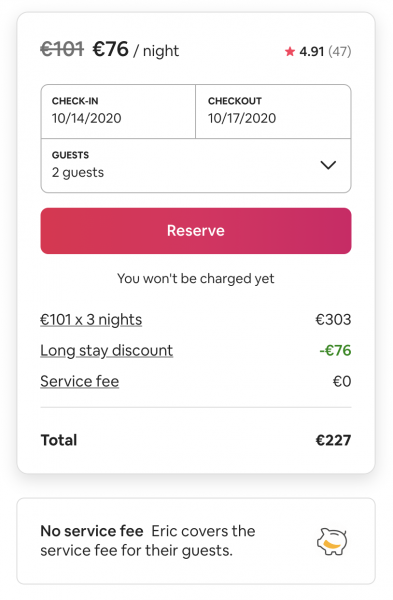
Since guests prefer listings with no “hidden” charges, they’ll be more likely to book your vacation rental.
The host-only fee is 14% – this is how much you’ll pay out of the price you set on Airbnb. To cover the difference, you can raise your daily rates on Airbnb or mark up your rates in the Rentals United channel manager.
Ultimately, adopting this new fee structure can help you get more bookings. Airbnb hosts who opted in to the host-only fee structure saw an 18% increase in bookings, according to Airbnb.
Develop an effective overall Pricing Strategy.
+ Airbnb pricing strategy tip: Give your guests the option to choose non-refundable pricing
Thanks to Airbnb’s new non-refundable pricing option, you can now let guests choose either a listing’s standard rate and cancellation policy or a 10% lower non-refundable rate.
Guests can see the reduced rate in search results, which can generate more views, bookings and revenue.
This new feature doesn’t override any of your existing settings, it simply adds an additional option from guests to choose from. You can deactivate and activate it any time you want.
According to Airbnb, adopting a non-refundable pricing option leads to an estimated 5% increase in revenue.
There’s nothing to lose – just try it and see how it goes!
Manage pricing via Reinventing Revenue Management.
Also tap into demand from Booking.com.
Editor’s note: This post was originally published in August 2018 and has been updated for accuracy, depth and comprehensiveness.
Are you ready to start earning more on Airbnb and other global & niche booking sites? Discover how our enterprise-level Channel Manager can get you more bookings.